

Komoot includes offline maps in one free region. AllTrails and Footpath charge for offline map downloads. For hikes in NSW national parks, the free NSW National Parks app also lets you download park maps and information.
Those differences matter when a hike takes you beyond mobile reception. Finding a track, drawing a route and keeping a usable map on your phone are separate tasks. The features below were checked against provider documentation on 26 October 2026.
Choose the track before drawing a route
For an unfamiliar hike, start with the park manager's track description. Check the grade, distance, expected walking time and current closures. A line drawn on a map does not establish that the ground is suitable for your group.
NSW National Parks' planning guide suggests checking daily distances, difficulty, walking hours and transport back to the start. It also recommends reading track notes and trip reports. These can add context, but check current park information before relying on an older account.
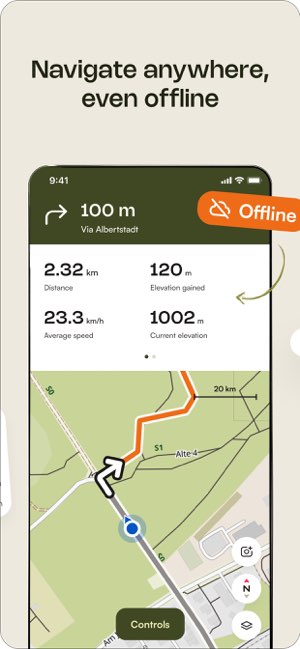
Komoot: offline maps in one free region
A new komoot account includes one region of your choice. Once claimed, that region cannot be changed. Check its boundary before choosing it for your hiking area.
The free region includes offline maps and turn-by-turn voice navigation. You can save routes or the region for offline use. Download what you need while you still have an internet connection.
This is a geographically limited free option, rather than free maps everywhere. If you hike in different areas, check which regions your account has unlocked before each trip.
The provider's navigation instructions say the region containing the starting point must be unlocked to enable navigation. If you leave the planned route, komoot needs an internet connection to calculate a new one.
For a route crossing a region boundary, verify the whole saved route downloads and opens offline. An unlocked starting point is not confirmation that every map you need is stored on your phone. The download instructions explain how to save and test a complete route in the app.
Get komoot from the App Store for iPhone or Google Play for Android.
AllTrails: explore tracks and plan on the website
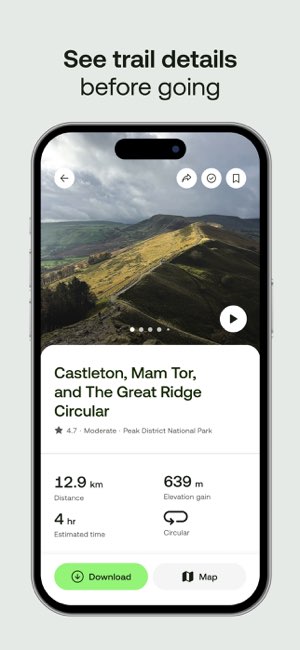
AllTrails says all members can create custom routes on its website. Creating and editing those routes in the mobile app requires Peak. Its route builder can follow mapped paths or draw straight lines between points.
For hiking, inspect any straight-line sections carefully. They may not follow a track. Use the official track description to check what the route represents.
Downloading maps to your phone requires a paid plan, either Plus or Peak. A saved favourite or a route created free on the website is not the same as a downloaded map.
Before leaving reception, open the app's Downloads section and check the map is stored on the phone. AllTrails identifies downloaded maps with a green circle on their card. Be logged into the app before going offline.
Get AllTrails from the App Store for iPhone or Google Play for Android.

Footpath: a supporting tool for drawing routes
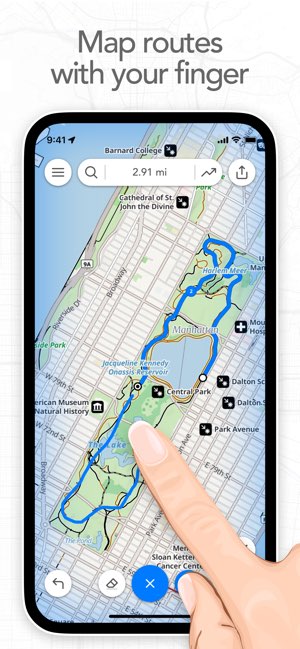
Footpath lets you trace mapped roads and trails, check distance and see where a route climbs. Its free tier allows access to five saved routes. This makes it a planning option once you have chosen a hiking track.
The paid Elite plan adds offline map downloads and audio navigation. Free viewed maps are only temporarily cached, meaning a temporary copy is kept on the phone. Opening a map earlier is not the same as downloading it for a hike.
Get Footpath from the App Store for iPhone or Google Play for Android.
NSW National Parks: a free option within its parks
The free parks app lets you download a park at home, then view its maps and information without reception. It includes planning details such as distances, track grades, accessibility and facilities.
Its role is a guide to NSW national parks, rather than a general route builder for hikes across Australia. If your chosen park is covered, it provides a free source of offline park information. Download the park before travelling, rather than waiting until you reach the trailhead.
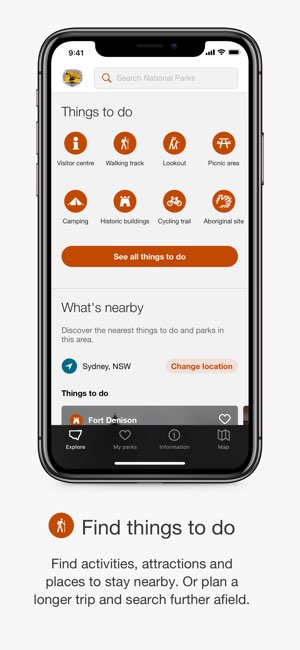
Get NSW National Parks from the App Store for iPhone or Google Play for Android.
Find a hiking group that matches your experience
If you want an organised outing, start with hiking groups on KeepActive. Set your suburb and compare nearby listings.
Ask about the track grade, distance, climbing, expected pace and required experience. Confirm what equipment to bring and whether the group offers a suitable first outing. A group listing is a starting point for those questions, rather than a guarantee that every hike suits beginners.
For up-to-date details on meeting point, time or any additional needs, please contact the organisers.
Prepare for conditions and a loss of reception
Before leaving, open the map you intend to use, then switch off mobile data and Wi-Fi. Check that the route and surrounding map remain visible. A successful test confirms what is available on that phone at that time; it does not confirm the track is open.
NSW's TREK guidance recommends a topographic map and compass, with the skills to use them. A topographic map shows the shape of the land, including hills and valleys. It also advises telling someone your route and expected return time, and carrying a personal locator beacon for emergencies.
A locator beacon sends a distress signal by satellite. An offline map helps you follow a route; it does not provide that emergency communication function.
The same safety guidance lists water, food, weatherproof clothing, a torch and first aid supplies among the basics. Choose equipment for the track and conditions, and check park alerts before travelling. A downloaded map does not replace these preparations.
Before leaving, check:
- The current track notices and weather forecast for the hiking area.
- The full route, return transport and time needed to finish.
- Your downloaded map with mobile data and Wi-Fi switched off.
- Your backup map, navigation skills and emergency equipment.
- Who has your trip plan and will act if you do not return on time.
Check free features and renewal terms in the Australian app listing before accepting a trial. A temporary trial should not be counted as an ongoing free offline option.
Cover photo: Snap Wander / Unsplash.